
Microsoft Bing Search
Microsoft CorporationTools
4.658.70K Reviews
- Version
- Varies With Device
- Installs
- 100.00M
- Age Rating
- Everyone
Screenshots

Our Review of Microsoft Bing Search
 Analysis by Appyee
I use a search app most when I need a quick answer and don’t want to turn a small question into a long browsing session. Microsoft Bing Search is built around that everyday habit, but its most interesting angle is the way it brings visual and voice-based searching into the same place as ordinary typed queries. That can make it handy when I’m unsure what to call something or have my hands full. It is not a perfect substitute for every search tool, though: results can vary, and the experience makes the most sense if its particular mix of search and Microsoft services suits you.
Why visual search changes the starting point
Typing assumes I already know the words for what I’m looking for. A picture can be a better starting point when I don’t. With Bing’s visual search, I can use a photo to begin an inquiry rather than trying to describe an unfamiliar object from memory. That shift is useful for things like identifying an item I’ve come across, finding more information about something in front of me, or exploring a subject when the right search terms aren’t obvious.
The practical benefit isn’t that a camera search always settles the question. It’s that it gives me another route into the search process. I can start with what I can see, then use the information I find to refine what I ask next. For a tool app, that flexibility is more meaningful than a flashy feature: it can reduce the effort needed to get from “What is this?” to a useful next step.
A Fresh Take on Search
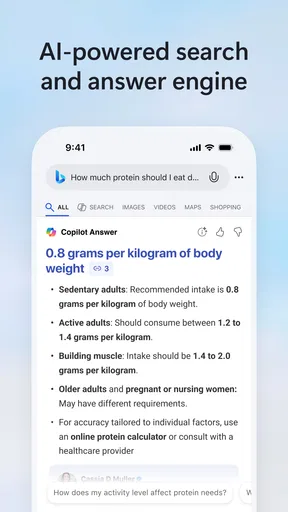
First things first, let's talk about the interface. The Microsoft Bing Search app has a sleek and modern design that feels intuitive and user-friendly. I mean, who doesn't love a clean look when you're trying to navigate through tons of information, right? It's got this neat layout that makes it super easy to find what you're looking for without getting lost in a sea of links.
The homepage is quite interactive and personalized. I noticed it offers quick access to trending topics and news, which is a nice touch. It's like having a little peek into what's happening around the world every time you open the app. Plus, the images are crisp, and the visual search feature is a game-changer. Just snap a pic, and Bing does its magic—pretty cool, huh?
How I’d use it in practice
For a useful visual-search workflow, I’d treat the first result as a lead, not a final answer. If I’m looking at an unfamiliar object, I can search from its image, note the terms or categories that appear relevant, and then run a more specific text search. That second step matters: a picture can help me find vocabulary, but I still need to judge whether the result actually matches the details I care about.
Voice search offers a different shortcut. I find it most practical when a query is easier to say than type, such as a longer question or a quick search while I’m occupied with something else. The trade-off is familiar: speaking aloud isn’t convenient everywhere, and a spoken query may need a quick correction if the app hears a name or phrase differently than I intended. I’d switch back to typing when precision matters or I’m somewhere quiet.
As a search app, Bing is free to download and is made by Microsoft Corporation. It has an Everyone age rating, and its average rating is 4.6 from around 1.7 million ratings, with more than 100 million installs. Those figures suggest it has reached a broad audience, but they don’t tell me whether it will suit my habits. I’d decide that by trying the kinds of searches I actually make, especially if I’m comparing it with the search app already set as default on my phone.
Features That Stand Out
Now, let's dig into some of the standout features. One thing that really caught my eye is the voice search capability. It's incredibly responsive and accurate. I tested it out with some tricky queries and, honestly, it handled them like a champ. Makes you think how far we've come from the "talk to text" days.
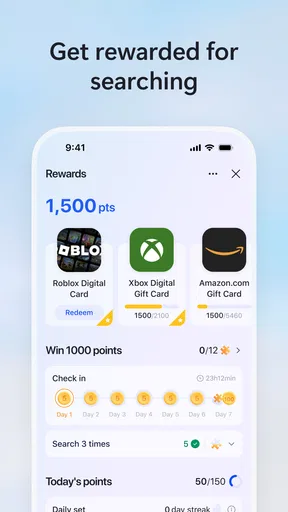
Another feature that deserves a shoutout is the rewards program. Who doesn't love getting points for doing something they already do every day? With Bing, you earn rewards for your searches, which can be redeemed for gift cards and such. It's like getting a little bonus just for being curious.
The app also integrates seamlessly with other Microsoft services, which is a huge plus if you're already in the Microsoft ecosystem. Accessing my Office documents and OneDrive files without switching apps felt like a breeze.
A realistic day for a curious searcher
Picture me in a shop, comparing two unfamiliar items while I’m messaging a friend for advice. I can use a quick search to check a term on the packaging, or try an image when I’m not sure what the item is called. Later, at home, I can follow up with a more exact phrase and take time to compare what I find. That mix of immediate lookup and deliberate follow-up is where I see Bing being most useful: it helps me begin a search in the way that fits the moment.
For someone already using Microsoft services, the connection to Office documents and OneDrive can also make a search session feel less detached from other tasks. I wouldn’t choose a search engine solely for that reason, but it may save a context switch when I’m looking for information alongside work or personal files. If I rarely use Microsoft’s services, that part of the appeal naturally matters less.
Performance and Usability
Performance-wise, the app is pretty solid. It loads quickly and doesn't lag, which is crucial when you're trying to get information on the fly. I tried it both on Wi-Fi and data, and it held up well in both scenarios. No one likes waiting for an eternity to get search results, am I right?
As for usability, it's straightforward. The navigation menu is simple, and everything is where you'd expect it to be. I didn't find myself hunting for options or getting frustrated with hidden settings. It's designed with the user in mind, which is always a win in my book.
Where it fits among search alternatives
If I’m comparing Bing with the search engine I normally use, I wouldn’t expect every query to produce the same set of results or the same ordering. A search that works well on one service may need different wording on another, so I’d test a few real questions rather than judge by a single result. Keeping Bing as a second option can be worthwhile when I want to compare answers or use an image or spoken query; switching completely is more compelling if its results and interface consistently fit my routine.
There’s also a difference between using a dedicated search app and searching from a browser. The app gives me a focused place for Bing’s search tools, while a browser may be more convenient if I prefer to keep searches beside open pages and other sites. Neither approach is automatically better. If I mainly want quick lookups, a dedicated app can feel direct; if I spend most of my time browsing, opening another app may add an unnecessary step.
Trade-offs worth knowing before you switch
The clearest limitation is result consistency. Search results are generally accurate, but I have encountered queries where they were less comprehensive than Google’s. For broad questions, that may not change much; for a narrow topic where I need several strong sources, I’d compare results rather than assume one search engine has shown me everything. Search is a starting point, and checking the underlying sources remains important.
Visual search also has a natural boundary: it can help me find a direction, but it can’t replace my own judgment about whether a match is actually right. Similar-looking items can lead to plausible but unhelpful results. I get more value when I use an image to generate better search terms, then narrow the question with text instead of stopping at the first apparent match.
The app includes in-app purchases, with items priced from $9.99 to $199.99 each. I’d keep that in perspective when deciding whether to install it: the core appeal for me is searching, and I would not treat optional purchases as necessary to answer ordinary questions. If I’m considering any purchase, I’d first check what it covers and whether it adds something I personally need.
Its history goes back to a release on November 11, 2010, and the app has around 58,000 written reviews. I see that scale as useful context, not proof that the app will be ideal for every phone or every search style. The best test is still whether the results, navigation, and ways of starting a query feel helpful in my own daily use.
Who gets the most from Bing
I’d recommend giving it a try if you often search by voice or image, want a second search option for comparisons, or already use Microsoft services and appreciate having them close at hand. It can also suit someone who likes seeing current topics on the home screen instead of opening directly into a blank search box. For casual research, quick definitions, and finding a starting point for an unfamiliar subject, those touches can make the app feel approachable.
I’d be less likely to recommend switching if your current search setup already gives you the results you need and you don’t want another app in your routine. It may also be the wrong fit if you need consistently comprehensive results for specialist research and would rather compare sources in a browser from the outset. In those situations, keeping your familiar search tool—or using more than one—may be more practical than expecting Bing to replace everything.
Room for Improvement
Of course, no app is perfect, and there are a few areas where Bing could tighten up a bit. For starters, while the search results are generally accurate, I noticed a few instances where they weren't as comprehensive as Google's. It's not a deal-breaker, but something to be aware of if you're making a comparison.
Also, while the app does a great job of integrating Microsoft services, it would be nice to see more third-party app integrations. Having everything under one roof would make it even more appealing to a broader audience.
Final Thoughts
All in all, the Microsoft Bing Search app is a solid choice for anyone looking for a fresh take on search engines. It's got a modern look, useful features, and a rewards program that adds a fun twist to everyday searches. Sure, there are a few areas to improve, but for what it offers, it's definitely worth checking out.
So, if you're in the market for a new search app or just want to try something different, give Bing a whirl. You might just find it's the right fit for your search needs. Don't forget to hit that download link and start exploring!
Privacy and Permissions
See what permissions an app requests and how it handles your data.
- Calendar
- read calendar events plus confidential information, add or modify calendar events and send email to guests without owners' knowledge
- Contacts
- read your contacts
- Location
- approximate location (network-based), precise location (GPS and network-based)
- SMS
- send SMS messages
- Phone
- directly call phone numbers, read phone status and identity
- Photos/Media/Files
- read the contents of your USB storage, modify or delete the contents of your USB storage
- Storage
- read the contents of your USB storage, modify or delete the contents of your USB storage
- Camera
- take pictures and videos
- Microphone
- record audio
- Wi-Fi connection information
- view Wi-Fi connections
- Device ID & call information
- read phone status and identity
- Other
- view network connections, pair with Bluetooth devices, full network access, change your audio settings, control Near Field Communication, run at startup, reorder running apps, set wallpaper, draw over other apps, control vibration, prevent device from sleeping, set an alarm, read Google service configuration
Verdict
Strengths of Microsoft Bing Search
- Seamless integration with Microsoft services.
- Voice search feature is highly accurate.
- Image search provides detailed results.
- Rewards system for frequent use.
- User-friendly and intuitive interface.
Limitations of Microsoft Bing Search
- Occasional lag in loading search results.
- Ads can be intrusive at times.
- Limited customization options.
- Requires Microsoft account for some features.
- Privacy concerns with data collection.
Other Releases by Microsoft Corporation
View All
Microsoft OneDrive
Productivity4.6

Microsoft OneNote: Save Notes
Productivity4.6

Link to Windows
Productivity4.0

Microsoft PowerPoint
Productivity4.8
Similar Picks in This Category
View All
Google LLC4.0

Gboard - the Google Keyboard
Google LLC4.5

Google Play services
Google LLC4.3

Google Play Store
Google LLC4.9

Files by Google
Google LLC4.5

SHAREit: Transfer, Share Files
Smart Media4U Technology Pte.Ltd.4.3
Frequently Asked Questions
What features does the Microsoft Bing Search app offer?
The Microsoft Bing Search app provides a comprehensive search experience, including web searches, image and video searches, news updates, and local business listings. It also integrates with Microsoft services like Office and Outlook, offers voice search capabilities, and provides a personalized homepage with customizable news feeds and weather updates.
Is Microsoft Bing Search app free to use?
Yes, the Microsoft Bing Search app is completely free to download and use. It offers a range of features without any hidden costs, although you will need an internet connection to access the search functionality. Additionally, some features may require a Microsoft account for a more personalized experience.
How does Microsoft Bing Search protect my privacy?
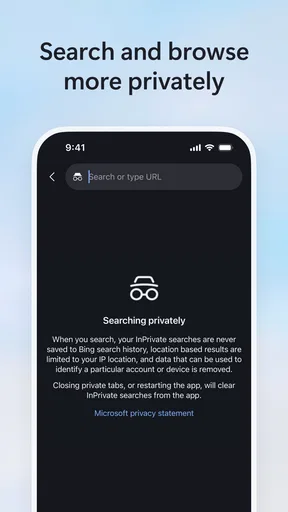
Microsoft Bing Search prioritizes user privacy by offering features like private search mode, which does not save search history. Microsoft’s privacy policy outlines how they handle your data, giving you control over personalized ads and data collection settings. Users can manage their privacy preferences in the app’s settings.
Can I use Microsoft Bing Search for voice search?
Yes, Microsoft Bing Search supports voice search. Users can simply tap the microphone icon within the app to initiate a voice search. This feature is designed to recognize natural language queries, allowing for a hands-free search experience, which is particularly useful when multitasking or on the go.
Does the Bing Search app integrate with other Microsoft services?
Absolutely. The Bing Search app seamlessly integrates with other Microsoft services, such as Office, Outlook, and OneDrive. This integration allows for a more streamlined experience, enabling users to access documents, emails, and files directly from the search app, enhancing productivity and connectivity.
